| 👉 In partnership with Teramind 
Teramind AI-driven User & Entity Behavior Analytics (UEBA) learns a baseline for every user and device with machine-learning models, then scores risk whenever live activity deviates.This automated profiling highlights abnormal log-ons, data access, or workflow shifts so security teams see emerging insider threats before policy rules even fire. Deep-learning algorithms stream-scan keystrokes, clipboard events, screen pixels, and file moves, issuing predictive alerts or automatically blocking exfiltration seconds in advance. Real-time anomaly detection cuts through noise, letting analysts focus on the few AI-flagged sessions that matter most. Teramind also "monitors the monitors": it recognizes ChatGPT, Gemini and other LLM sessions, parses prompts and outputs with NLP content inspection, and quarantines anything that resembles sensitive data. Dashboards quantify enterprise AI adoption and surface risky usage patterns, giving managers the insight to foster safe, productive generative-AI workflows. - Generative-AI content guardrails: NLP engines inspect ChatGPT/Claude prompts and outputs on the fly, flag unusual usage and quarantine sensitive text to enforce DLP.
- Predictive workforce insights: Teramind's AI engine fuses hundreds of behavioural signals to surface disengagement trends, hidden leaders and early insider-threat cues.
| | 🤔 Why Instagram's Boss Says the Platform Must Change - Fast 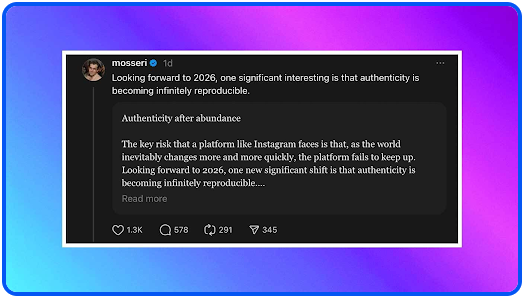
Brief Buzz: Instagram chief Adam Mosseri says AI-generated content has shattered the glossy, curated aesthetic that once defined Instagram. In a recent year-end essay, he argues that raw, imperfect posts are now the clearest signal of what's real online. - Younger users (under 25) are ditching polished grids for DMs, casual snaps, and unflattering candids
- AI images and videos have made "perfect" visuals easier—and less trustworthy—than ever
- Mosseri suggests cryptographic photo signatures at capture to verify real media
- Instagram plans to label AI content, add more account context, and give creators tools to compete with AI
- Trust is shifting from "Is this image real?" to "Who posted this—and why?"
Why Should You Care?
If AI can fake perfection instantly, authenticity becomes the new social currency. Expect messier feeds, more skepticism, and platforms valuing who you trust over what you see. 👉 Who's the Ghost Running Fake Profiles? | | ⚡️ 5 AI Tools to Supercharge Your Productivity 👉 Paycor - AI features include an intelligent assistant for instant HR answers, AI-driven candidate sourcing that prioritizes top talent, and predictive analytics that forecast turnover and highlight workforce trends, enabling faster decisions, reduced bias, and more efficient HR operations. 👉 Paychex - delivers AI powered conversational HR and payroll support, AI driven recruiting for candidate matching, predictive analytics for workforce trends, and generative AI insights via natural language queries, enabling automation and faster data informed decisions. 👉 TriNet is an HR and payroll platform that now integrates AI-driven analytics to optimize workforce management. It uses AI insights to predict employee turnover and engagement trends. The tool also offers AI-powered compliance monitoring to automatically detect and flag potential HR risks. 👉 ActivTrak - AI-powered workforce-analytics engine auto-classifies every app & website activity to reveal focus vs distraction trends and productivity baselines. Predictive coaching dashboards surface "nudges" for managers, using ML to flag at-risk teams and recommend schedule or workload tweaks. 👉 CapFront - This small-business funding marketplace uses "innovative technology" including machine-learning and AI-driven analytics to assess credit risk more quickly and accurately, enabling faster approvals and streamlined underwriting. | | 🚀 Nvidia's Vera Rubin Supercomputer Raises the AI Ceiling 
Brief Buzz: Nvidia just pulled forward the future of AI computing. At CES, CEO Jensen Huang unveiled Vera Rubin, a next-gen supercomputing platform delivering a massive leap in performance—and arriving six months earlier than expected. - 5× more compute power than Nvidia's previous generation, now in full production
- Built from six chip types and 1,152 GPUs across 16 racks, designed to work as one system
- Optimized for agentic AI, advanced reasoning, and mixture-of-experts models
- Cuts inference costs up to 10× and uses 75% fewer GPUs for training vs. Blackwell
- First teased at Computex 2024 and detailed further at GTC 2025
Why Should You Care?
Cheaper, faster AI compute means better AI products sooner—from smarter assistants to more powerful creative and scientific tools. Nvidia's efficiency gains could also lower costs and energy use, shaping how quickly advanced AI reaches everyday users, even as rivals like Google, Amazon, and AMD race to catch up. 👉 NVIDIA lagging? Reset graphics driver quick | | 🤔 What's Behind Microsoft's "Good Neighbor" AI Data Center Plan? 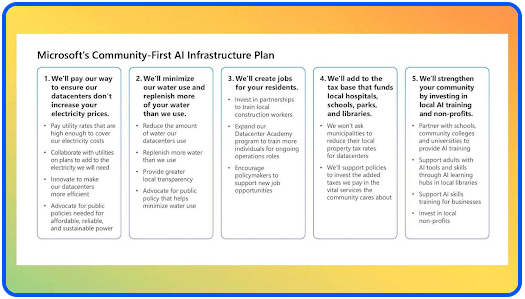
Brief Buzz: Microsoft just unveiled "Community-First AI Infrastructure," a plan aimed at easing growing local backlash against AI data centers. As demand for AI computing explodes, the company is promising to shoulder more of the environmental and economic burden itself. - Microsoft says AI data centers won't raise local power bills, asking utilities to charge rates that fully cover energy costs
- Commits to a 40% cut in water-use intensity by 2030, using closed-loop cooling that avoids local drinking water
- Pledges to pay full property taxes—no special breaks for data centers
- Launches job training programs for nearby residents to work on data center construction
- Follows pressure from U.S. senators and remarks by Donald Trump that tech companies should "pay their own way"
Why Should You Care?
AI isn't just online—it's physical. These data centers can affect your electricity bill, water supply, and local jobs. If Microsoft's promises stick, it could set a new standard for how AI growth impacts everyday communities. 👉 Boost Growth with Top Cloud Providers | | 📱 Apple and Google Confirm Major Update to Siri Experience 
Brief Buzz: After months of speculation, Apple and Google officially confirmed a multi-year AI partnership. According to their joint statement, Google's Gemini models will underpin Apple's core AI systems - including the long-awaited Siri overhaul expected later this year. - Apple says Gemini offers the "most capable foundation" for its AI ambitions
- Bloomberg previously reported Apple may pay ~$1B annually, as detailed in its earlier report
- Apple confirmed to CNBC that its ChatGPT deal with OpenAI remains active, per this CNBC coverage
- AI features will still prioritize on-device processing and Private Cloud Compute
- The announcement briefly pushed Google's market cap past $4T, trailing only Nvidia, Microsoft, and Apple
Why Should You Care?
This deal could finally make Siri noticeably smarter, while showing that even Apple now leans on competitors to stay competitive in AI—reshaping privacy expectations, platform power, and who's really behind the intelligence in your devices. | | 🎨 How to Create LinkedIn Carousels Using ChatGPT and Canva 
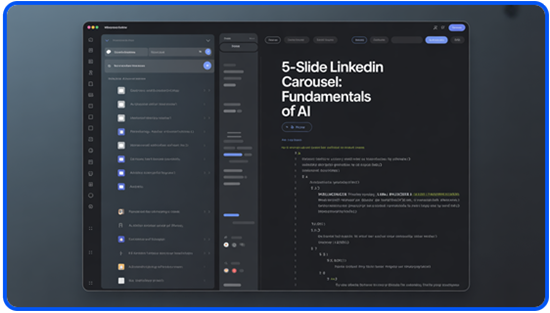
In this walkthrough, you'll learn how to quickly build polished LinkedIn carousels using ChatGPT's Canva app integration. This setup lets you write the content and design the slides seamlessly in one place, saving time while keeping everything consistent. Step-by-step - Go to ChatGPT, open a new chat, click the '+' button, choose Canvas, and then enter the following prompt exactly:
"Write a 5-slide LinkedIn carousel on '(your topic)'. Slide 1: A hook. Slides 2-4: One tip each. Slide 5: A CTA. Keep each under 40 words"
This step ensures your structure, flow, and word count are optimized from the start. - Inside Canvas, refine your content for clarity and tone. Once satisfied, activate Canva by entering:
"@canva, create a 5-slide LinkedIn carousel using this content [paste slides]. Use a (detailed style of your choice). Stick to the content copy exactly"
This tells Canva to focus strictly on design, without altering your approved copy. - Preview the 4 design options that ChatGPT generates. Select your favorite, then click the Canva link to open the editable carousel directly in Canva.
- In Canva, review each slide, make any final tweaks, then click Download. Choose PDF for LinkedIn documents or PNG for individual slides, depending on how you plan to publish.
💡 Pro Tip If you regularly post on LinkedIn, save a Canva brand kit with your brand colors and fonts. When you reference them in your chat prompt, the integration can apply that branding automatically—helping you maintain a consistent, recognizable look across all your carousels. 👉 Master Social Chaos with Power Tools | | 📸 AI Generator Images: Games 
| |
|


